How to Remote Start Jeep Grand Cherokee in 10 Easy Steps
Many Jeep Grand Cherokee owners want the convenience of remote starting their vehicle but often find the process confusing or tricky. You’re not alone—figuring out how to do it smoothly can be frustrating, especially if you’re new to the feature.
Luckily, with a few simple steps, you can enjoy the comfort of starting your Jeep from a distance whenever you need.
To remote start your Jeep Grand Cherokee, first confirm your model supports the feature, usually by checking for a remote start button or icon on the fob. Lock all doors, then press and hold the remote start button within five seconds.
Make sure all doors and the hood are closed, and the vehicle is in park. Use the Uconnect app for additional control if available.
For a safe and smooth experience, follow location, safety, and customization tips mentioned throughout the process. Keep exploring for more detailed steps.
Key Takeaways
- Confirm that your Jeep Grand Cherokee supports remote start. You can do this by checking the owner’s manual, your VIN, or looking at the key fob for the remote start button.
- Lock all the doors first, then press and hold the remote start button, which looks like a circular arrow. Do this within five seconds of locking the doors.
- Make sure your vehicle is in “Park,” all doors are closed, and the area around the vehicle is clear. Safety first!
- Wait for the vehicle to flash its lights, signaling that remote start has been activated. Once you see the lights, check that the engine is running.
- Keep an eye on the surroundings and ensure proper ventilation. Avoid starting the vehicle in enclosed spaces to stay safe.
Does Your Jeep Grand Cherokee Have Remote Start?
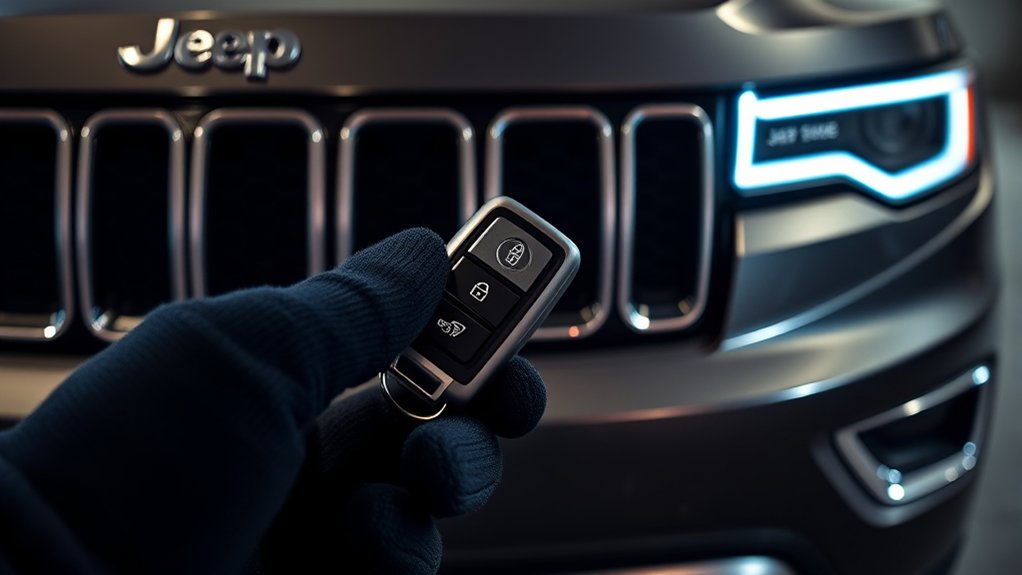
Wondering if your Jeep Grand Cherokee has remote start? Not all models come with this feature, so it’s a good idea to check your vehicle’s details.
Look at your key fob—if it has a circular arrow button, that’s a good sign your vehicle might support remote start.
A circular arrow button on your key fob suggests your Jeep Grand Cherokee may support remote start.
This system is more common in higher trims and newer models, usually from 2014 onward. To be sure, check your owner’s manual or contact a Jeep dealer with your VIN.
They can confirm if your Jeep Grand Cherokee supports remote start based on its build. If you see a dedicated remote start button or icon on your key fob, it probably means the feature is available.
Always verify before trying to use remote start to avoid any surprises.
How to Prepare Your Jeep for Safe Remote Starting
Before you try using remote start on your Jeep Grand Cherokee, it’s a good idea to take some safety precautions to make sure everything goes smoothly. First, make sure all doors, the hood, and the trunk are fully closed to avoid any hazards.
Check that your vehicle is in “Park” and the parking brake is engaged. This helps prevent any accidental movement when starting remotely. Also, make sure no children, pets, or objects are near the vehicle during startup.
It’s important to verify that the check engine light and other warning lights are normal, indicating no faults. Always perform remote start in a well-ventilated area and avoid enclosed spaces like garages.
Use this simple table to help you prepare:
| Safety Check | Important Detail |
|---|---|
| Doors, Hood, Trunk | Fully closed |
| Gear | In “Park” |
| Surroundings | Clear of children & pets |
| Vehicle Systems | No faults or warning lights |
| Location | Well-ventilated area |
How to Activate Remote Start With the Key Fob
To activate the remote start on your Jeep Grand Cherokee using the key fob, follow a simple sequence. First, make sure all doors are locked with your key fob.
Within five seconds of locking, press and hold the remote start button, usually marked with a circle arrow icon, until your vehicle’s lights flash.
Ensure the vehicle is in “Park” and the hood is closed before starting. The remote start will run the engine for about 10-15 minutes, depending on your settings.
Using the Uconnect App to Remotely Start Your Jeep
First, download and set up the Uconnect app on your phone, making sure your Jeep Grand Cherokee is compatible with remote start. Log in with your Jeep account and pair your vehicle via Bluetooth or Wi-Fi.
Once you’re connected, just tap the “Remote Start” button on the app’s dashboard to start your engine from anywhere with cellular or Wi-Fi service.
App Setup and Compatibility
Setting up the Uconnect app is easy and lets you remotely start your Jeep Grand Cherokee without hassle. First, download and install the Uconnect app from the App Store or Google Play.
Next, check if your vehicle supports the remote start feature by reviewing the owner’s manual or vehicle specs. Once you confirm, create an account in the app and link your vehicle using its Vehicle Identification Number (VIN).
This step pairs your vehicle with the app and enables remote control functions. Remember to keep your vehicle’s software and the Uconnect app updated for smooth operation, security, and compatibility.
With proper setup, you can confidently use the app’s remote start feature from almost anywhere with an internet connection.
Remote Start Procedure
Once you’ve set up the Uconnect app and linked it to your Jeep Grand Cherokee, starting your vehicle remotely is simple. Open the Uconnect app on your smartphone, then go to the main dashboard.
Tap the “Remote Start” button to begin the process. Confirm your command if prompted, and your vehicle’s engine will turn on, running for about 10 minutes depending on your settings.
You can also use the app to check your vehicle’s status, lock or unlock doors, or stop the engine remotely if needed. This makes it easy to start your Jeep from a distance, so it’s warm or cool before you even step outside.
The Uconnect app provides a straightforward, reliable way to control your Grand Cherokee remotely.
What Is the Range and Limitations of Your Jeep’s Remote Start?
Your Jeep Grand Cherokee’s remote start usually works within about 300 feet. But obstacles like walls or interference can cut that range down.
Environmental factors such as weather, metal structures, or electronic signals might also weaken the connection. Keep in mind, the remote start won’t work if the vehicle is undergoing maintenance or if certain conditions like an open hood are present.
Signal Range Variability
Have you ever wondered how far your Jeep Grand Cherokee’s remote start can reach? The signal range of your key fob usually extends up to 300 feet, but several factors can influence this distance.
Obstacles like buildings, metal structures, or thick walls can significantly cut down the effective signal range. Environmental interference from other electronic devices or radio signals might also disrupt communication.
The battery strength in your key fob is crucial; a weak battery can reduce the remote start’s effective distance. For more convenience, the Uconnect app lets you start your vehicle remotely from almost anywhere with internet access.
This way, you can bypass physical range limits and start your car even if you’re far away. Knowing these factors helps you get the most reliable remote start experience and ensures your vehicle responds when you need it.
Environmental Interference Effects
Environmental interference can significantly reduce your Jeep Grand Cherokee’s remote start range, making it less reliable in certain situations. Obstacles like buildings, trees, and metal objects can weaken or block the signal, limiting how well the remote start works.
Electronic devices such as cell phones, Wi-Fi routers, and nearby power lines can also disrupt the signal, further decreasing the range. Weather conditions, like heavy rain or snow, can interfere with signal strength and reliability as well.
If you’re using the Uconnect app for remote start, issues with cellular or Wi-Fi connectivity caused by environmental factors can restrict your control. These interference effects mean your remote start might not work as expected if you’re in areas with lots of obstacles or electronic noise, so keep these factors in mind when activating your Jeep’s remote start system.
Limitations During Maintenance
During maintenance or repairs, the remote start system’s functionality might be temporarily limited. This can affect how far and reliably you can operate it.
The typical remote start range for your Jeep Grand Cherokee’s key fob is about 300 feet. However, obstacles like buildings, trees, or electronic interference can significantly reduce this distance.
Environmental factors and physical barriers may also impact remote start performance. Additionally, the Uconnect app’s remote start depends on cellular or Wi-Fi connections, which can be affected during maintenance.
Keep in mind that remote start will be disabled if the hood is open, the key fob is inside, or the doors are unlocked. The engine will automatically shut off after 10-15 minutes if not manually stopped, regardless of remote start limitations.
Troubleshooting Remote Start Problems on Your Jeep Grand Cherokee
When your Jeep Grand Cherokee’s remote start isn’t working, there’s often a simple fix before you need professional help. Start by checking the key fob battery; a weak or dead battery can stop the remote start from working.
Make sure all vehicle doors, the hood, and trunk are fully closed, and the vehicle is in park. These things can prevent remote start from activating. Also, check that there’s no issue with the vehicle, like a check engine light or an open hood, which can disable remote start.
Confirm that your Jeep model actually supports remote start, since some trims might not have this feature. Finally, reduce interference from environmental obstacles or nearby electronic devices that could weaken the remote signal.
These easy steps often solve common remote start problems and get you back on the road quickly.
Customizing Your Remote Start Settings for Convenience and Safety
Once you’ve confirmed your remote start works properly, you can make your driving experience even better by customizing its settings for convenience and safety. Use the app or vehicle menu to adjust options like how long the remote start runs and your climate control preferences.
You can also change automatic door locking and unlocking features to improve security and make access easier. Additionally, you might want to turn notifications and alerts on or off to stay updated on your vehicle’s status.
Saving your personalized settings ensures your preferences are remembered for the future. If your vehicle supports it, you can set specific temperatures and air circulation options during remote start for maximum comfort.
Customizing these settings helps you enjoy a safer, more convenient drive that’s tailored just for you.
What to Do After Starting Your Jeep Remotely
After you’ve remotely started your Jeep Grand Cherokee, it’s important to let the engine run for the full 10-15 minutes before turning it off manually. This helps the engine warm up properly, especially in cold weather, and keeps everything running smoothly.
During this time, check your EVIC on-screen instructions to confirm the vehicle’s readiness and proper operation. When you’re ready to stop the engine, press the start/stop button or turn off the vehicle inside the cabin once it’s safe.
Before driving, make sure all doors are unlatched and the vehicle is in Park. Following the proper remote start process helps protect your engine, ensures safety, and gets your Jeep ready for a smooth drive when you’re ready.
Safety Tips for Remote Starting in Different Environments
Always make sure the area around your Jeep Grand Cherokee is well-ventilated and clear of debris before remote starting. Never start your vehicle in enclosed spaces like garages or tunnels to prevent dangerous exhaust buildup.
Keep an eye out for environmental conditions, pets, children, and flammable materials nearby to stay safe.
Ventilate Open Spaces
Ventilating open spaces is crucial for safely remote starting your Jeep Grand Cherokee, especially outdoors. Make sure you’re in a well-ventilated area to prevent exhaust gases from building up and causing health issues.
Always remote start outside, avoiding enclosed spots like garages or carports, even if they’re partially open. Keep a safe distance from flammable materials like leaves, grass, or oil when using remote start.
Use your vehicle only in open spaces free from structures or overhangs that could trap fumes. Check safety guidelines regularly to stay informed and keep everyone safe.
Avoid Enclosed Areas
Remote starting your Jeep Grand Cherokee in enclosed areas is risky because exhaust fumes can quickly build up and pose serious health hazards. Never use remote start in enclosed spaces like garages, as poor ventilation allows carbon monoxide to accumulate and create a dangerous environment.
Always check that the area around your vehicle is open and free of flammable materials before activating remote start. Avoid starting your Jeep under a car cover, which restricts airflow and increases fire risk.
Use remote start only in well-ventilated outdoor environments to ensure exhaust fumes don’t get trapped. Be cautious in tight alleys or narrow driveways, where limited airflow can lead to dangerous gas buildup. Proper ventilation is essential for safe remote starting in any environment.
Frequently Asked Questions About Jeep Grand Cherokee Remote Start
Have questions about using the remote start feature on your Jeep Grand Cherokee? Here are some common answers:
- Not all Jeep Grand Cherokee models support remote start. Check your owner’s manual or VIN to confirm.
- To activate remote start, press the lock button, then hold the remote start button within five seconds.
- The engine runs for about 10-15 minutes before shutting off automatically.
- You can also start your Jeep Grand Cherokee remotely via the Uconnect app, offering added convenience.
Troubleshooting? Make sure your key fob battery is fresh, all doors and the hood are closed, and your vehicle supports remote start. These steps help ensure smooth operation of your remote start system.
Frequently Asked Questions
How to Remote Start a Jeep Grand Cherokee With a Key?
To remote start your Jeep Grand Cherokee with a key, make sure all doors are locked. Then, press and hold the remote start button on your key fob until the lights flash, usually within five seconds.
Check that the vehicle is in park, the hood is closed, and no one is inside. If done correctly, the engine will start and run for about 10-15 minutes depending on your settings.
How to Enable Remote Start on Jeep Cherokee?
Enabling remote start on your Jeep Cherokee is like opening a secret door to convenience.
First, check if your vehicle has the feature on the key fob, indicated by a circular arrow. Then, access your vehicle’s settings via the Uconnect app or infotainment system to activate it.
Make sure the system is enabled in the menu, and test it by locking your car and pressing the remote start button twice within five seconds.
What Is the Lock Button 3 Times Remote Start?
The “Lock Button 3 Times Remote Start” is a way to start your Jeep Grand Cherokee remotely by pressing the lock button on your key fob three times quickly.
This method works on certain models and helps boost security by making sure you really want to start the vehicle.
Just make sure to press the buttons within a few seconds and check your owner’s manual to see if this feature is compatible with your car.
How Does Remote Start Work on a Jeep Grand Cherokee?
Remote start on your Jeep Grand Cherokee works like magic, letting you start your engine from afar in seconds. You activate it by pressing the lock button once, then holding the remote start button on your key fob within five seconds.
The system uses radio frequency signals to communicate, starting the engine and climate control. Keep the hood closed and doors locked to guarantee the remote start works flawlessly, making your vehicle ready when you are.
Conclusion
Remote starting your Jeep Grand Cherokee is a handy feature that can save you time and effort. It’s pretty convenient, especially on chilly mornings or hot days when you want to cool down or warm up your vehicle before getting in.
Just keep in mind that while many believe remote start is safe, some folks worry it might increase the risk of theft or accidents if not used properly. It’s always smart to follow safety guidelines and know your vehicle’s limits.
By staying informed and cautious, you can enjoy the benefits of remote start without compromising your safety or security. And with a little care, you’ll be able to use this feature confidently and effectively.